
Thumbnails
How box art and screenshot images are downloaded, matched, and displayed.
Image Sources
All images come from libretro-thumbnails on GitHub. Three image types are available per system:
- Box art – cover art / box art
- In-game screenshots – captured during gameplay
- Title screens – title screen captures
Where Things Live
- Manifest (the per-repo list of available filenames) lives in the host-global
external_metadata.db(/var/lib/replay-control/external_metadata.db) under thethumbnail_manifestanddata_sourcetables. One copy per host — every storage shares it. - Image files stay per-storage at
<storage>/.replay-control/media/<system>/<kind>/. The actual bytes live with the ROMs so an unplugged storage doesn’t lose its art.
This split means a fresh storage (or one that just lost its DB) can rebuild the manifest from disk without re-fetching from GitHub.
Downloading Images
From Library Management and Metadata (Settings > Library & Games > Game Library):
- Per-system download – download images for a single system
- Download All – batch download images for all systems
- Cancellable – imports can be cancelled with real-time progress updates
- Auto-deletes cloned repos after matching to save disk space
During library scans and rebuilds, missing artwork is queued after each system is enriched. The library becomes browsable before downloads finish. Artwork is downloaded in this order:
- Box art
- Title screens
- In-game screenshots
When an update adds artwork support for another system, Replay Control imports the new image source at startup and rematches games already in the library. A newly supported system does not need a ROM rename or a full library rebuild before its available artwork can be queued.
The downloader keeps request concurrency bounded. If GitHub responds with temporary throttling or service-unavailable errors, Replay Control retries a few times with backoff instead of opening many requests at once.
Download jobs that keep failing are retained for troubleshooting, but Replay Control stops resubmitting them after a small attempt cap. If a future thumbnail manifest update changes the source entry for the same image, the job becomes eligible again with a fresh attempt budget.
After scan/rebuild and thumbnail update maintenance, Replay Control refreshes stored artwork totals from the downloaded media folders, split by box art, title screens, and screenshots. Library Management and Metadata reads those stored totals instead of walking the media folders while the page loads, so already-downloaded artwork is counted even when no new files were fetched.
Image Matching
The app uses smart multi-tier matching to connect ROM files with their images:
Both PNG and JPG images are supported. The matching logic checks for both extensions.
- Exact match – ROM display name matches an image filename directly
- Tag-stripped match – region and revision tags are stripped for looser matching (e.g., “Super Mario World (USA)” matches “Super Mario World”)
- Version-stripped match – version numbers are also removed for even looser matching
- On-demand download – if no local match is found but an image is known to exist in the libretro-thumbnails catalog, it is fetched in the background and appears on the next page load
Arcade ROMs use internal codenames (e.g., sf2.zip), so the app automatically translates codenames to display names before matching.
Screenshot Gallery
The game detail page displays a screenshot gallery with labeled images:
- Title Screen – shown with a “Title Screen” label
- In-Game – shown with an “In-Game” label
Box Art Swap
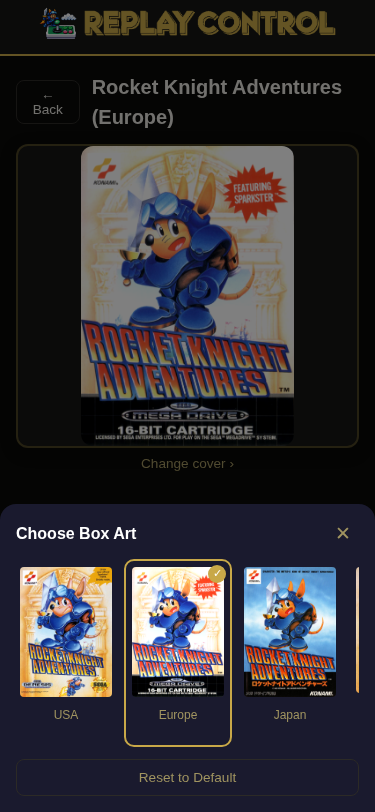
On the game detail page, you can pick alternate region-variant cover art. The feature shows all available boxart variants for the game (e.g., US, European, Japanese covers) and lets you choose which one to display. Your choice is preserved across metadata clears.
Thumbnail Counts
Library Management and Metadata shows per-system thumbnail counts, reflecting both matched box-art coverage and downloaded artwork already present on disk.
Cleanup
Deleting a game also removes downloaded box art, screenshots, and title-screen images that are unique to that game. Shared images stay in place when another variant, clone, or translation still uses the same artwork.
The orphan cleanup action checks all three thumbnail folders (boxart, snap,
and title) and removes downloaded images that no remaining library entry can
use.