
Metadata
How game metadata is sourced and used.
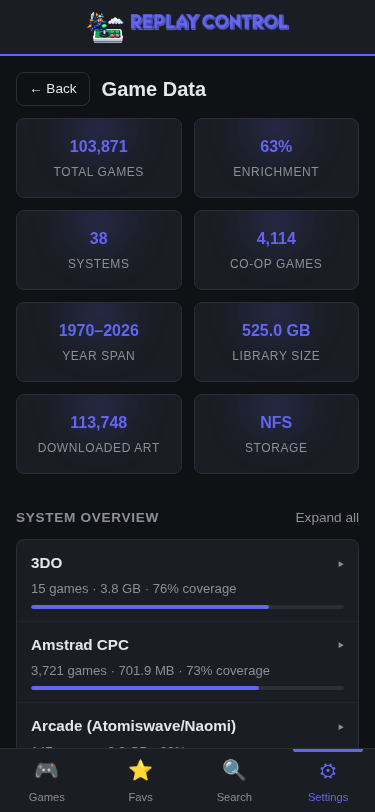
Offline-First Design
Replay Control works fully offline from the first install. Built-in databases provide genre, player count, year, and display names for ~34K console ROMs and broad arcade metadata without any network access.
When connected to the internet, you can optionally enrich your library with additional data from external sources. These fill gaps that the built-in data does not cover but are never required.
Built-In Data
Console Games (~34K ROMs)
Display names, year, genre, developer, player count, and region for games across 20+ systems. Data is sourced from No-Intro, TheGamesDB, and libretro-database at build time.
Games are identified by filename, with a CRC32 hash fallback for 9 cartridge systems when the filename does not match the database.
Arcade Games
Covers MAME, FBNeo, and Flycast (Naomi/Atomiswave) arcade systems. Each entry includes display name, year, manufacturer, player count, rotation, driver status, clone/parent relationships, and category.
Entries from the source metadata are retained, including categories such as gambling, slot machine, computer, handheld, and electromechanical, so ROMs from full MAME sets can still be identified.
Genre Taxonomy
Both console and arcade databases map to a shared set of ~18 normalized genres: Action, Adventure, Beat’em Up, Board & Card, Driving, Educational, Fighting, Maze, Music, Pinball, Platform, Puzzle, Quiz, Role-Playing, Shooter, Simulation, Sports, Strategy, and Other.
Series Data
~5,345 game series entries across 194+ franchises from
Wikidata (CC0), with sequel/prequel chains and ordinals. The repository carries a generated data/wikidata/series.json snapshot so release builds do not depend on live Wikidata SPARQL availability. See
Game Series for details.
Community Metadata
Curated entries for ROMs not covered by upstream sources — for example AmigaVision (a single boot file that bundles ~3,000 Amiga games), aftermarket cartridges, and homebrew compilations. Stored as JSON in data/community/<system>.json and baked into catalog.sqlite at build time. Anyone can submit a PR adding new entries; no Rust code changes are required. See
Contributing community metadata for the schema and submission flow.
External Metadata (Optional)
LaunchBox Refresh
Download the LaunchBox XML file (~460 MB) from the metadata page. One-button “Refresh metadata” handles download → parse → match → enrich:
- Real-time progress updates (downloading, parsing, enriching) via the activity SSE stream
- The XML is parsed once into the host-global
external_metadata.db(/var/lib/replay-control/external_metadata.db); per-storage caches no longer hold a copy - Boot-time freshness is content-derived (CRC32 of the XML vs. the last-parsed stamp) — newly added ROMs after a refresh pick up metadata automatically on the next enrichment
- Per-system coverage, romset composition, release-date and publisher coverage, media suggestions, and downloaded artwork totals are stored in
library.dband refreshed during scan/rebuild and thumbnail update maintenance, so the metadata page can show library stats without walking the media folders while the page loads - On a fresh install, local library discovery can start without waiting for optional network metadata. If metadata cannot be downloaded, the scan still completes and enrichment catches up when sources are available later.
Data imported: description, rating, rating count, publisher, developer, genre, max players, release date, cooperative flag, and LaunchBox video links.
Where the built-in database already has a value (e.g., genre), it takes priority. LaunchBox data only fills gaps. Description, publisher, and resource suggestions are denormalized into per-storage library.db tables so the game-detail page reads them from a single pool.
Bundled Resource Links
Release builds also bundle manual links from
MiSTer Manual Downloader and the
Retrokit manuals Archive.org collection, plus Shmups Wiki strategy guide and video-index links, into catalog.sqlite. Only URL indexes are bundled; the manual PDF/text file itself is downloaded and validated only when the user saves it from a game detail page.
During scan/enrichment, matching resources are copied into the per-storage library cache. Game detail pages can then show manual suggestions and guide links offline without fetching source indexes at request time; saving a manual downloads and validates the file so it remains available later if the appliance is offline. The metadata page shows bundled manual-link and guide-link counts in the built-in data section.
Box Art and Screenshots
See Thumbnails for image downloads from libretro-thumbnails.
ROM Tag Parsing
ROM filenames are parsed to extract region, revision, and classification tags. Supported naming conventions:
- No-Intro – parenthesized tags:
(USA),(Rev 1),(Hack),(Beta), etc. - GoodTools – bracket flags:
[!]verified,[h]hack,[T-Spa]translation, etc. - TOSEC – structured tags: year, publisher, side/disk, country codes, language codes, format suffix
ROM Classification
ROMs are classified into tiers that affect their visibility in recommendations and variant sections:
| Category | Examples | Effect |
|---|---|---|
| Original | No special tags | Included in recommendations |
| Revision | (Rev 1), (Rev A) | Shown as variant, included in recommendations |
| Translation | (Traducido Es), [T+Spa] | Separate section, excluded from recommendations |
| Hack | (Hack), [h1] | Separate section, excluded from recommendations |
| Special | (Unl), (Homebrew), (Beta), (Pirate) | Excluded from recommendations |
Cache Management
The metadata page provides tools to manage stored data:
- Clear metadata – wipes provider metadata/resources and resets the XML hash stamp so the next refresh re-parses from disk
- Clear images – removes downloaded box art and screenshots from disk + clears
box_art_urlfromgame_library - Cleanup orphaned images – removes downloaded images no longer associated with any game in the library, with a safety threshold per system to prevent accidental mass deletion