
Game Detail
Everything on the game detail page: info, media, navigation, and actions.
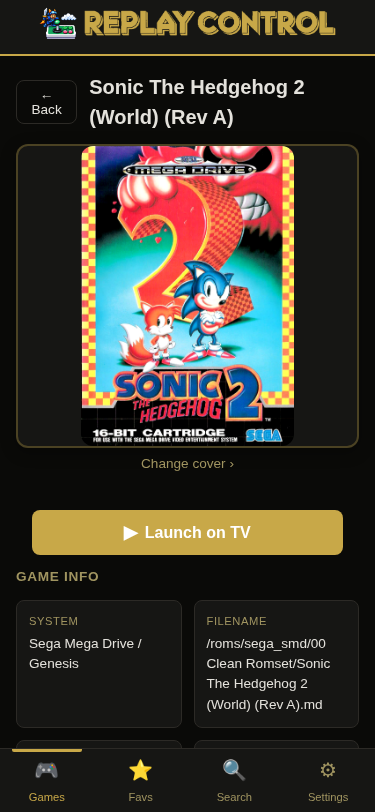
Box Art and Screenshots
The top of the page shows box art with a screenshots gallery. Tap the box art to browse screenshots and title screens in a lightbox carousel.
Game Info Card
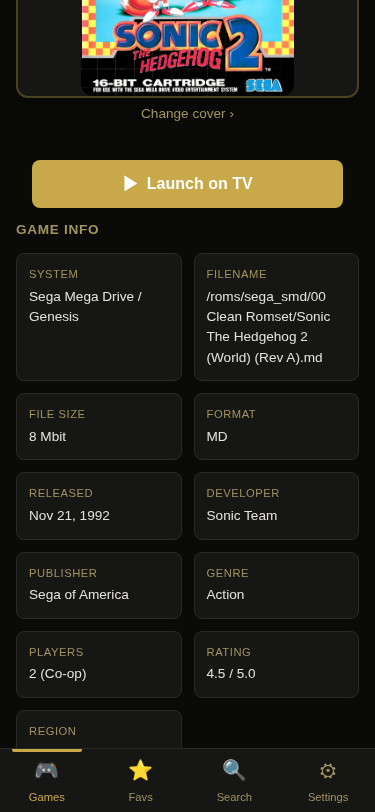
A summary card displays:
- System and filename
- Storage size (KB/MB/GB)
- ROM capacity (Mbit/Kbit) for cartridge and ROM-chip systems where that historical unit is meaningful
- Developer, release year, genre
- Player count and co-op support
- A 🏆 RetroAchievements indicator when the game has a known achievement set. The match is by content, so it reflects the exact version you own. A short note appears when RePlay can’t actually award those achievements — for example on systems whose emulator doesn’t support them (PlayStation, PC Engine CD, arcade MAME). Compressed disc images (
.chd) are also affected for now, pending a RePlayOS fix - For arcade games, the hardware board with its manufacturer (e.g. “CPS-2 (Capcom)”) — a link to that board’s page. See Arcade Boards.
- For arcade games, a Mature category flag when the source category data marks the entry with
* Mature *.
Launch on TV
A “Play” button sends the game to RePlayOS for immediate launch on the connected TV. Available when the Pi is running RePlayOS with a supported core.
User Screenshots
Screenshots captured on RePlayOS are matched to games by filename and displayed in a dedicated section. Tap any screenshot to view it in a fullscreen lightbox.
Videos
Paste a video URL directly, or search for gameplay videos using privacy-respecting Invidious/Piped instances (no YouTube API or tracking). Replay Control also suggests video links imported from metadata providers such as LaunchBox when they match the game. Pin a result to save it for the game. Pinned videos appear on future visits without re-searching.
Game Manuals
Manuals can come from several places:
- Bundled catalog suggestions – MiSTer Manual Downloader and Retrokit manual links are matched during library enrichment and shown without live index fetching
- Saved URLs – pasting a manual URL downloads the PDF/text manual into
<storage>/.replay-control/manuals, validates the file type, and records it inuser_data.db - Uploaded manuals – PDF and plain-text files can be uploaded from the detail page and are stored under
<storage>/.replay-control/manuals - Legacy local manuals – existing manuals in
<storage>/manualsor ROM-folder side files are displayed read-only when detected
Hand-placed manuals under <storage>/manuals are organized per system using the same folder names as the ROM folders (for example manuals/nintendo_snes), with two shared folders: manuals/arcade for all arcade systems and manuals/pc for DOS and ScummVM. Manuals placed under the older shorthand folder names (such as manuals/snes) are moved to the current names automatically on startup, so nothing needs to be reorganized by hand.
Language preferences from Settings are respected when multiple manual languages are available, but other languages can still be shown. Saved manuals can be removed from Replay Control later; read-only legacy files are left untouched.
Box Art Swap
Browse alternate box art from libretro-thumbnails, typically region variants (US, EU, JP covers). Select any alternate to replace the current box art display.
Game Series
Sequel/prequel breadcrumb navigation with play order position (e.g., “2 of 5”). Series siblings appear as a horizontal scroll of game cards. See Game Series for details on data sources and matching.
Alternate Versions
Games identified as clones or region variants of the current game, grouped and displayed as cards. Useful for finding a specific region release or revision.
Also Available On
Cross-system availability: the same game on other systems in your library. Tap to jump to that version’s detail page.
Variant Sections
Collapsible sections grouping related ROMs by type:
- Regional variants – different region releases (USA, Europe, Japan)
- Translations – fan translations and language patches
- Hacks – ROM hacks and modifications
- Specials – unlicensed, homebrew, beta, prototype, and other special releases
Each section is collapsed by default and shows the count of variants.
Distribution Channel Tags
Games distributed through special channels display a tag: SegaNet, Satellaview, Sega Channel, or Sufami Turbo. These tags appear as badges on the info card.
Related Games
Genre-based recommendations: other games in your library that share the same genre. Displayed as a horizontal scroll of game cards at the bottom of the page.
For arcade games, a More on this board row also appears — other games on the same hardware board, with a “See all” link to the board page. See Arcade Boards.
Actions
Available from the detail page:
- Favorite – toggle favorite status
- Rename – inline rename with extension protection (restricted for formats where renaming would break the game)
- Delete – confirmation dialog showing file count and total size, with smart multi-file handling (M3U + disc files, CUE + BIN, ScummVM data directories, SBI companions)