
Auto-Updates
Keep Replay Control up to date directly from the web UI. The update system checks GitHub releases for new versions and handles the full download-install-restart cycle without SSH or manual file transfers.
Overview
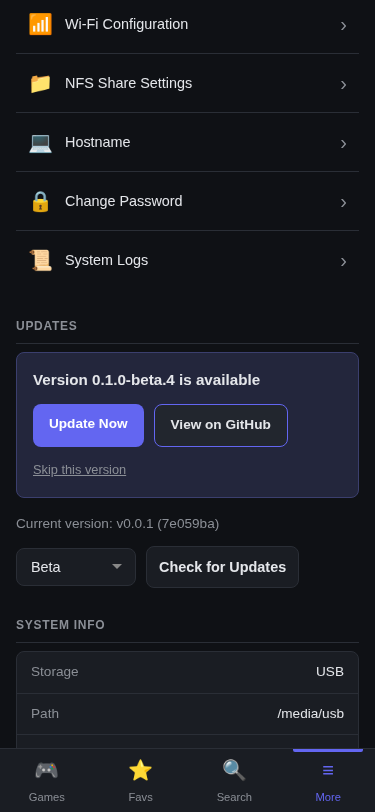
Updates are managed from the Settings page under the Updates section. The current app version and git commit hash are shown there. The app checks for new releases automatically in the background and displays a banner when an update is available.
Update Channels
Choose between two release channels:
- Stable – production-ready releases (default)
- Beta – pre-release builds with new features that may have rough edges
Switch channels from the dropdown in the Updates section. The app immediately checks for available updates when you change channels.
Automatic Checks
The app checks for updates automatically:
- 60 seconds after startup – first check after the service starts
- Every 24 hours – periodic background checks
No action is needed – if an update is available, a banner appears on the Settings page.
Manual Check
Click Check for Updates to check immediately. The button shows a loading state while the check runs, and displays “Up to date” or an update banner with the result.
Update Banner
When a new version is available, the banner shows the version number, a What’s new changelog, and two actions:
- Update Now – starts the download and install process
- Skip this version – dismisses this specific version; it won’t appear again unless a newer version is released
What’s new
The banner lists the release notes for every version released since the one you’re running, newest first – not just the latest – so you can see everything an update brings before installing it. Each version is collapsible (the newest is expanded); a link to the full release on GitHub is available under each one if you want it.
On the Stable channel, beta (pre-release) versions are hidden by default; tick Show beta releases to read them too. They stay informational – Update Now still installs the latest stable version. On the Beta channel, all versions are shown.
Install Process
Clicking Update Now navigates to a dedicated updating page that shows progress through each phase:
- Downloading – fetches the new binary and site assets from GitHub
- Installing – replaces the current binary (the previous version is kept as a
.bakfile for rollback) - Restarting – restarts the service
- Reloading – the browser automatically reloads once the new version is running
The entire process is protected by a 5-minute timeout. If something goes wrong, temporary update files are cleaned up automatically.
Any tabs you had open during the update will pick up the new version on their own, no manual refresh or cache clear needed.
Rollback
The previous binary is preserved as a backup file (.bak) during each update. If an update causes problems, the previous version can be restored manually via SSH.
GitHub API Key
GitHub’s public API allows 60 requests per hour. If you check frequently or share a network with other GitHub API consumers, you may hit this limit.
To increase the limit to 5,000 requests per hour, add a GitHub personal access token:
- Navigate to Settings > GitHub API Key
- Enter a token (no special scopes required – public repo access is sufficient)
- The token is used for both update checks and metadata downloads